
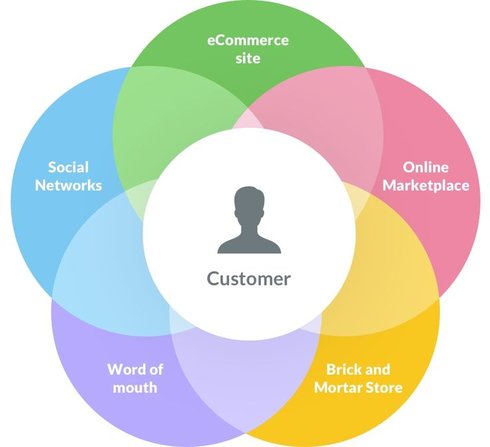

Prerequisites for Omnichannel Customer Experience Automation
Before deploying automation tools, you need a clear map of where your customers currently interact with your brand. Omnichannel customer experience automation works best when it connects distinct channels—like email, chat, and in-store visits—into a single, coherent journey. If your data is siloed, automation will only scale confusion.
Start by auditing your existing tech stack. Do your CRM, help desk, and e-commerce platform share a unified customer profile? Without a single source of truth, an automated response might ignore a customer’s recent purchase history, leading to disjointed service. Verify that your integrations can pass context seamlessly between touchpoints.
Next, define the specific workflows you want to automate. Avoid the temptation to automate everything at once. Pick high-volume, low-complexity tasks first, such as order status updates or basic FAQ responses. This approach lets you test reliability without risking the customer experience on complex, error-prone logic.
Finally, establish clear escalation paths. Automation should handle the routine, but it must know when to hand off to a human agent. Define the triggers for these handoffs—such as sentiment analysis flags or repeated failed attempts—and ensure your support team is trained to pick up the conversation without making the customer repeat themselves.
Follow the process
Building an omnichannel customer experience automation strategy requires aligning technology with actual customer behavior rather than forcing shoppers into rigid silos. The goal is to create a continuous thread that follows the customer from initial discovery through post-purchase support, regardless of the channel they choose. This section walks through the specific steps to implement this integration effectively.
Step 1: Map the Customer Journey Across Touchpoints
Start by documenting every interaction a customer has with your brand, including website visits, mobile app usage, in-store purchases, and social media engagements. Identify where friction occurs, such as when a customer abandons a cart on mobile but completes the purchase on desktop without their previous items in the cart. Use analytics tools to visualize these paths and pinpoint drop-off points.
This mapping exercise reveals which channels are most critical for your specific audience. If data shows that 60% of your support inquiries originate from social media, that channel requires robust automation for initial triage. Avoid assuming all customers prefer the same path; segment your journey maps by customer type, such as new buyers versus loyal repeat customers.
Step 2: Unify Customer Data into a Single View
Fragmented data is the primary obstacle to true omnichannel experiences. Implement a Customer Data Platform (CDP) or a robust CRM that aggregates data from all touchpoints into a single profile for each customer. This unified view should include purchase history, browsing behavior, support tickets, and communication preferences.
When data is centralized, your automation tools can trigger relevant actions based on the complete picture. For example, if a customer returns an item in-store, the system should automatically flag this in their digital profile so that online support agents are aware of the transaction. This prevents customers from having to repeat information and creates a sense of continuity.
Step 3: Automate Personalized Interactions
With a unified data foundation, deploy automation rules that deliver personalized content and offers. This goes beyond using a customer’s first name in an email. Use behavioral triggers to send relevant product recommendations based on past purchases or abandoned carts. If a customer frequently buys organic products, automate a notification when new organic items are added to your inventory.
Ensure your automation respects privacy preferences and frequency caps. Over-automating can feel intrusive. Set clear rules for how often a customer receives automated messages and provide easy opt-out mechanisms. Personalization should feel helpful, not invasive.
Step 4: Integrate AI for Real-Time Support
Incorporate AI-driven chatbots and virtual assistants that can handle routine inquiries across all channels. These tools should be trained on your unified customer data to provide context-aware responses. If a customer messages your chatbot about a delayed shipment, the AI should immediately pull up their order status and offer solutions, such as a discount on the next purchase or an expedited shipping option.
AI should handle the volume of simple queries, freeing human agents to focus on complex issues that require empathy and nuanced judgment. Ensure seamless handoffs between AI and human agents, transferring the full conversation history so customers do not have to repeat themselves.
Step 5: Measure Performance and Iterate
Establish key performance indicators (KPIs) that reflect the health of your omnichannel strategy. Track metrics such as customer satisfaction (CSAT), net promoter score (NPS), customer effort score (CES), and cross-channel conversion rates. Regularly review these metrics to identify areas for improvement.
Conduct regular audits of your automation workflows. Are the triggered emails still relevant? Is the chatbot resolving issues effectively? Use customer feedback and support ticket analysis to refine your processes. Omnichannel strategy is not a one-time setup but an ongoing optimization effort.
Step 6: Train Staff and Align Teams
Technology alone cannot deliver an omnichannel experience. Ensure that all staff, from sales associates to customer support agents, understand the strategy and are trained to use the integrated tools. Provide them with access to the unified customer view so they can offer consistent service whether the interaction is in-person, over the phone, or online.
Break down internal silos between marketing, sales, and support teams. Encourage collaboration and shared goals. When teams work together, they can better anticipate customer needs and deliver a cohesive experience.
Step 7: Scale and Expand
As your omnichannel strategy matures, look for opportunities to expand into new channels or deepen integrations. This might involve adding voice commerce, augmented reality try-ons, or loyalty programs that span all touchpoints. Continuously monitor emerging technologies and customer trends to stay ahead of the competition.
Remember that scaling should be done thoughtfully. Ensure that new channels are integrated seamlessly into your existing ecosystem and that your data infrastructure can handle the increased volume. Regularly revisit your KPIs and adjust your strategy as needed to maintain a high-quality customer experience.
Implementation Checklist
-
Map all customer touchpoints and identify friction areas
-
Implement a CDP or CRM for unified customer data
-
Set up automation rules for personalized interactions
-
Deploy AI chatbots with context-aware capabilities
-
Define and track KPIs like CSAT, NPS, and CES
-
Train staff on integrated tools and omnichannel principles
-
Schedule regular audits and strategy reviews
-
Plan for scaling into new channels or technologies
Avoid these mistakes
Even with the best tools, omnichannel customer experience automation often fails because of structural blind spots. The most common error is treating each channel as a separate silo rather than a single, continuous conversation. When support agents on social media cannot see email history, or when chatbots repeat information already provided via phone, trust erodes instantly. This fragmentation turns a potential advantage into a source of frustration.
Another frequent pitfall is over-automating before the process is stable. Deploying complex AI workflows without clear handoff protocols to human agents creates dead ends. Customers expect consistency, not complexity. If an automated response cannot resolve the issue, the transfer to a human representative must be seamless, with full context preserved. Without this bridge, automation feels like a barrier rather than a help.
Finally, ignoring data privacy regulations in the rush to personalize experiences is a high-stakes mistake. Omnichannel strategies rely on data aggregation across touchpoints. Failing to secure this data or obtain proper consent can lead to regulatory penalties and reputational damage. Ensure that every automated interaction complies with current privacy standards while maintaining a smooth user journey.
Common questions about omnichannel customer experience automation
Implementing omnichannel customer experience automation in retail involves specific technical and operational hurdles. These answers address the most frequent practical objections before you commit to a strategy.
These distinctions matter because they determine whether your automation efforts will feel helpful or intrusive to your shoppers.
No comments yet. Be the first to share your thoughts!